Product Texts for Amazon, eBay and Kaufland: Requirements and Checklist
A product text that works in your own shop can be suppressed or removed on a marketplace. This guide shows what Amazon, eBay and Kaufland require for titles, bullet points and descriptions, and how to check AI-generated texts before you upload them.
Contents
A product text that works in your own shop is not automatically allowed on a marketplace. Amazon, eBay and Kaufland have their own rules for titles, bullet points and descriptions. Breaking them can mean suppressed offers, rewritten titles or removed listings.
AI makes this more pressing. A language model writes fluently, but knows neither your product nor the current marketplace policies. This guide sums up the requirements and shows how to check texts before upload.
Before you start: The rules change and can differ by category and country. Everything below comes from the official help pages, checked on 19 October 2026. Check the current version before making larger changes.
Amazon: checklist
According to the Seller Central page "Product title requirements and guidelines" (Germany), the following applies to all product types except media:
- Title: no more than 75 characters, including spaces
- Item highlights: an extra 125 characters for product details, as comma-separated phrases
- Prohibited characters in the title: ! $ ? _ { } ^ ¬ ¦ – other symbols such as ~ # < > * only in specific contexts, for example "<10 kg", never as decoration
- No word more than twice in the title (prepositions, articles and conjunctions excepted; brand names count)
- No promotional phrases in the title, such as "free shipping" or "100% quality guaranteed", and no subjective additions such as "best seller"
- No all caps in titles, bullet points or descriptions
For bullet points, the character limit depends on the product type; at least three are recommended. Bullet points may be removed or changed if they contain emojis, special characters such as ™ or ®, placeholder text such as "N/A", guarantee statements, company information, links and contact details, or certain claims such as "eco-friendly" or "anti-bacterial".
For the description, the "Product detail page rules" allow no HTML, JavaScript or other code, except line breaks. Also not allowed: price, availability or condition details, external contact information (phone, address, email, website, social media handles), reviews and testimonials, advertising, and references to other ways of ordering. Content must be in the store's local language.
eBay: checklist
- Title: eBay's seller portal gives 80 characters for the listing title.
- No unrelated keywords: The search manipulation policy prohibits popular search terms unrelated to the item, comparisons with other products and search terms with question marks.
- No special characters: The item description policy rules out superscript and subscript characters and symbols such as "©" instead of words.
- Consistent details: The item condition must match across title, description and item specifics.
- Language: The description must be in the main language of the eBay site you list on.
- No active content: JavaScript, Flash, plug-ins and forms are not allowed. Listings containing them cannot be published.
- No external links: Only a few exceptions are allowed, such as other eBay pages, embedded product videos or legally required information, always over HTTPS.
- No contact details: No email address, phone number or chat ID in the listing. Business sellers give contact details only in the "Business information" section.
On mobile, eBay shows a short description, which you can write yourself in up to 800 characters.
Kaufland: checklist
The product data guideline in the Kaufland Seller University works with recommendations rather than hard limits:
- Title: 50 to 80 characters recommended. Longer titles may be shortened or partially hidden.
- Not allowed in the title: symbols, emojis, unusual special characters, all caps (except brand names), strings of keywords, duplicated content, promotional statements such as "best price" or "free shipping", seller information
- Description: 150 to 5,000 characters recommended, continuous text plus bullet points. Plain text or HTML, no JavaScript.
- Not allowed in the description: links, images and videos, advertising copy, misinformation, health claims, keyword spam, information on condition, shipping or contact details, prices, discounts, warranty information and explanations of product tests
- Translations: Kaufland states explicitly that automatically generated translations are not permitted.
- Short description (keywords): The "short_description" field is used for search only and does not appear on the product page. Kaufland recommends no more than 10 relevant keywords, comma-separated, without HTML or emojis.
Kaufland's five principles are complete, correct, clear, consistent and condensed; conflicts between title and description count as errors.
Before and after: an example
The following example is entirely made up and is for illustration only. "ExampleBrand" stands for any brand.
Before (unchecked AI draft):
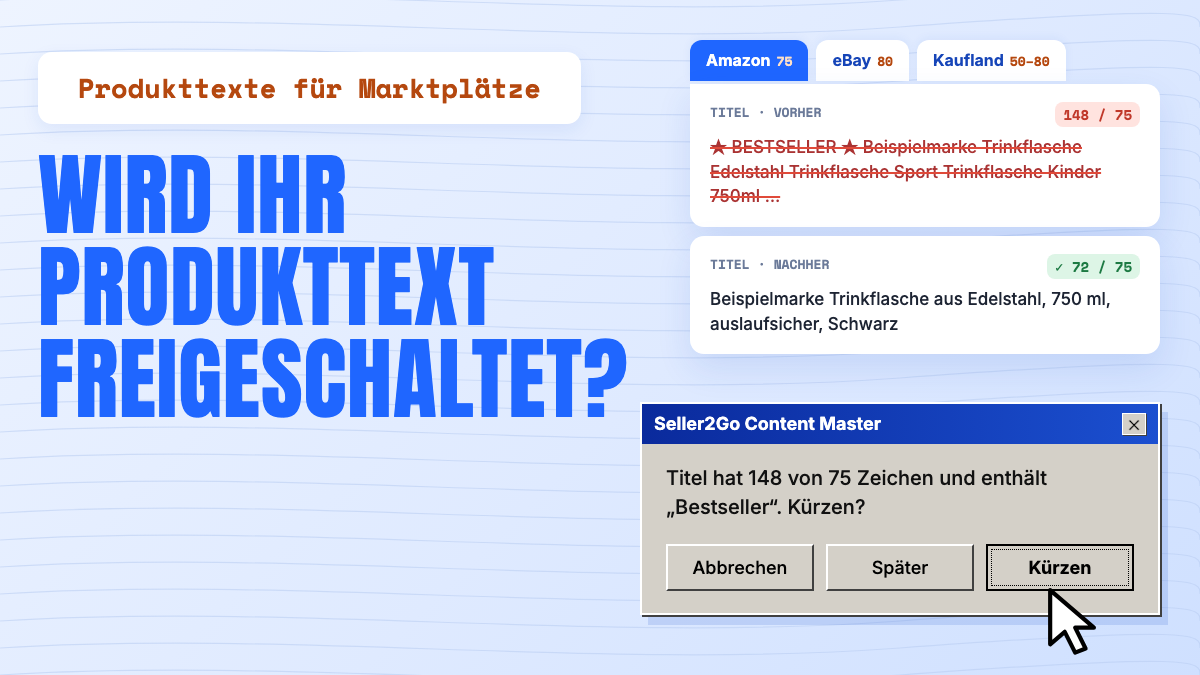
Title: ★ BESTSELLER ★ ExampleBrand Water Bottle Stainless Steel Water Bottle Sports Water Bottle Kids 750ml Leak-Proof Eco-Friendly – Free Shipping! Description: The BEST bottle on the market! Keeps drinks cold for 48 hours. Order today, get it tomorrow. Questions? Email us at info@example.com. 100% money-back guarantee!
Why it fails:
- 141 characters: too long for Amazon (75) and eBay (80), above Kaufland's recommendation
- Stars, an exclamation mark and "BESTSELLER" in capitals
- "Water Bottle" three times in the title
- Advertising ("Free Shipping", "the BEST bottle"), delivery promise, guarantee, email address
- "Eco-Friendly" without evidence
- "Cold for 48 hours": is that in your product data? If not, the AI made it up.
After:
Title: ExampleBrand Stainless Steel Water Bottle, 750 ml, Leak-Proof, Black Description: This stainless steel water bottle holds 750 ml and is suitable for sports, the office and travel. The screw cap is leak-proof. [Add further properties only if they are documented in the manufacturer's data.]
The new title has 68 characters and fits all three marketplaces. The description contains only statements backed by product data.
Checking AI texts before upload
AI delivers a draft; you remain responsible for the listing. Check every generated text in this order:
- Compare facts with your product data. Every number, material and feature must come from your item data or manufacturer documents. Invented values are a typical AI error.
- Check length per channel. A title written for eBay (80 characters) may already be too long for Amazon (75 characters).
- Look for prohibited content. Promotional claims, prices, shipping and warranty notes, contact details, links, emojis, special characters.
- Check formatting. No HTML on Amazon, no JavaScript on eBay or Kaufland.
- Remove repeated keywords. Language models tend to repeat search terms.
- Rule out contradictions. Title, description and attributes must say the same thing.
- Check the language. Kaufland does not allow automatically generated translations; have a fluent speaker review them.
How to create and approve AI descriptions from JTL-Wawi is covered in Creating AI product descriptions with JTL-Wawi.
Common reasons for rejection
- Amazon: The title breaks the policy (length, prohibited characters, repetition, promotion). Amazon may then correct it automatically or the listing may not appear in search results. Non-compliant bullet points may be removed or changed.
- eBay: Active content triggers the error "Disallowed JavaScript/HTML Syntax", and the listing cannot be published. For policy violations, eBay can remove listings, issue warnings or restrict the account.
- Kaufland: Missing mandatory attributes make the product data invalid, so it is not displayed. Gross disregard of the guideline can restrict your sales activity.
Seller2Go Content Master
Content Master creates product texts from your JTL-Wawi data and writes them back to Wawi after your approval. According to the product page:
- Two-pane workspace: raw Wawi data on the left, the new text on the right
- Field-by-field editing: adjust a single title or bullet point without regenerating the whole page
- Versioning: restore earlier versions of individual fields
- JTL-Shop rules: HTML restrictions are applied automatically
- Your approval: nothing is applied without your consent
- Translations into the languages configured in your Wawi
Marketplace listings are available as a separate add-on. More at seller2go.com/content-master.
Note: This article is for general information only and is not legal advice. Marketplace policies change regularly. Last updated: October 2026.