
Lieferbar
Last updated: August 28, 2026
Available for delivery
This view shows the deliverable orders from JTL-Wawi. According to the app description, this functionality is part of the mobile-app-related Seller2Go workflow and displays order and shipping information from the connected shop system.
What is shown in this section?
After opening the feature, an overview of the deliverable orders appears. The data is taken directly from JTL-Wawi and displayed in Seller2Go in a grouped format.
Visible information in this view
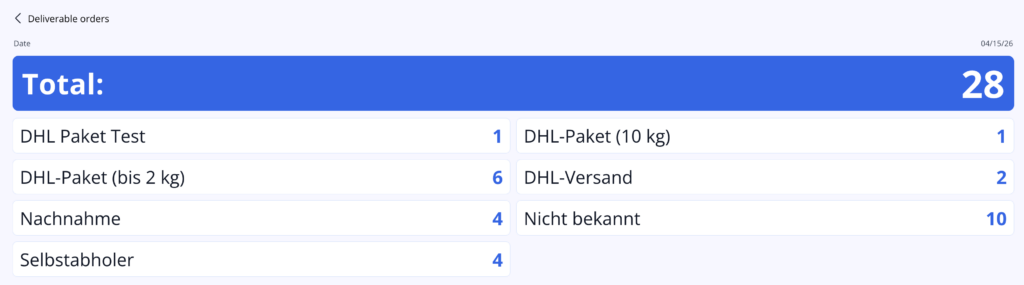
In your example, the following information is shown, among other things:
- date of the overview
- total number of currently deliverable orders
- list grouped by shipping or order type
- quantity for each entry
For example, the orders are grouped here by:
- DHL Paket Test
- DHL Parcel (up to 2 kg)
- DHL Parcel (10 kg)
- DHL Shipping
- Cash on delivery
- Self pickup
- Unknown
What is this view intended for?
This overview is meant to help you see at a glance:
- how many orders are currently deliverable
- how they are distributed across the different shipping methods
- whether certain shipping methods occur especially often
- whether there are orders without a clean shipping-method assignment, for example “Unknown”
✓ Note:This view is a compact overview and is mainly intended for quick checking. It does not initially show the complete order with all details, but rather a summarized display by shipping type.
✓ Important:Since the data is taken from JTL-Wawi, what you see depends on which orders are already marked there as deliverable and how the shipping methods have been maintained in Wawi.
Result of this section
After opening this feature, you will see a current summary of the deliverable orders from JTL-Wawi directly in Seller2Go.
Completed:
- “Available for Delivery” section opened
- deliverable orders reviewed
- total number checked
- distribution by shipping method understood